

Good products automate tasks. Great products improve decision-making.
Every organization believes its operational processes are unique.
They’re usually right—but not because the workflow itself is unique.
It’s the hundreds of small business decisions hidden inside the workflow that make enterprise software difficult to build.
A New Store Opening (NSO) process looks deceptively simple: identify a location, obtain approvals, execute the fit-out, and launch the store.
But once you start mapping the actual operations, the picture changes dramatically. Every organization has its own approval hierarchy, compliance requirements, document lifecycle, turnaround times, and exceptions. What appears to be a single workflow is actually dozens of interconnected decision points involving multiple stakeholders working in parallel.
Looking back, the technology wasn’t the hardest part.
The product decisions were.
The Build vs. Reuse Dilemma Isn’t Binary
Before we could argue about build versus reuse, we had to agree on what we were actually building for. For anyone outside retail, here’s the shape of a new store opening—six stages that look linear on a slide but run with approvals threading through all of them.
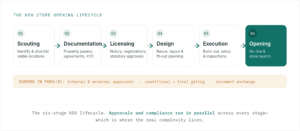
One of the earliest discussions was whether we should simply deploy an existing New Store Opening Zvolv solution or build on top of our platform.
At first glance, the answer appears obvious. Ready-made solutions promise faster implementation, lower cost, and proven functionality. It’s a tempting proposition.
Until the first workshop.
Very quickly, conversations begin to sound familiar.
“Document requests can be raised at any stage during the site opening lifecycle.”
“We’ll receive a conditional approval from this department, and that’s enough for the project to move forward until the licensing stage.”
“Everyone should be able to view the details, but only a few people should be able to edit or approve them.”
“Trigger this task only when a conditional approval becomes a final approval.”
None of these requests are unreasonable.
Individually, each looks like a small customization.
Collectively, they define how the organization actually operates.
This is where many enterprise implementations go wrong. Teams often approach the decision as a choice between reuse and customization. In reality, it’s a spectrum. The challenge is identifying where configuration is sufficient, where composition of existing capabilities is enough, and where genuine customization creates lasting business value.
We started by thoroughly mapping every step of the business journey—store scouting, property documentation, licensing, notary and registrations, recce, design, execution, and store opening. Only after understanding the complete process did we evaluate every requirement through three simple questions:
Can it be configured?
If the platform already supported the requirement through configuration, we never customized it.
Can it be composed?
Many seemingly unique requirements could be solved by combining existing capabilities instead of introducing new logic.
Does it create genuine business value?
Only then did we invest in customization.
This approach allowed us to preserve the platform’s maintainability while ensuring the product felt purpose-built for the client’s operations.
IN PRACTICE
Take one requirement that sounded custom. A stakeholder asked us to “trigger the licensing task only when a conditional approval becomes a final approval.” On paper it read like new logic: a bespoke approval state, custom status transitions, and a trigger engine to watch for the change—roughly two weeks of development, plus a piece of code we would own and maintain forever.
But mapped against what the platform already offered, the requirement dissolved into three existing building blocks: a status field to hold “conditional” versus “final,” a stage gate that already stopped downstream stages from starting, and a rule-based task trigger that fires on a status change. No new code. What looked like a two-week custom build became a half-day of configuration—and because it rode on native capabilities, it stayed stable and upgraded cleanly alongside the rest of the platform.
Requirements Don’t Change. Understanding Improves.
One lesson surprised me more than anything else.
Requirements rarely change because clients don’t know what they want.
They change because software forces people to visualize scenarios they have never needed to describe before.
Every workshop uncovers another edge case. Every product demo replaces assumptions with concrete conversations. What begins as “We need an approval workflow” gradually evolves into discussions around exceptions, alternate paths, temporary approvals, and operational nuances that have existed for years but were never formally documented.
The requirements were never wrong.
They were simply incomplete.
One of the biggest responsibilities of a Product Manager isn’t collecting requirements—it’s distilling them. Every day involved prioritizing, filtering, mapping business intent, simplifying user journeys, and challenging assumptions.
The question slowly shifted from:
“Can we build this?” → “Should we build this?”
That distinction made all the difference.
Enterprise Products Naturally Drift Toward Complexity
Every enterprise product suffers from something I like to call Product Entropy.
Every stakeholder has one justified exception. Every department needs one additional approval. Every compliance rule introduces another conditional branch.
Individually, every request makes perfect sense.
Collectively, they slowly transform an elegant product into something difficult to understand and even harder to maintain.
The role of Product Management is not simply to add functionality. It is to actively resist unnecessary complexity while protecting business flexibility.
Sometimes saying “No” creates more customer value than saying “Yes.”
The Document Workflow That Changed My Thinking
One particular workflow challenged this philosophy more than any other.
Document requests.
At first glance, it seemed straightforward—a heavily manual process involving multiple actors, approvals, and document exchanges. We initially automated it using the platform’s native workflow capabilities, expecting configuration to be sufficient.
It wasn’t.
As implementation progressed, expected behavior and business requirements began contradicting one another. Users wanted temporary review cycles, additional document requests, conditional approvals, and the flexibility to handle unexpected situations without disrupting the primary workflow.
For nearly two days, we explored increasingly sophisticated technical approaches. Every solution appeared to solve one problem while introducing another.
Eventually, we stopped discussing implementation. Instead, we asked a much simpler question.
“What is the user actually trying to accomplish?”
That conversation changed everything. A candid discussion between the client, engineering, and product revealed that we had optimized the workflow before fully understanding user intent. Once we aligned on the actual business objective, the solution became surprisingly simple.
Instead of redesigning the primary workflow, users could temporarily spin off a lightweight sub-workflow that naturally merged back into the original process.
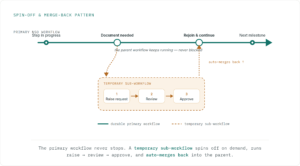
The implementation itself took less than two hours. That same design pattern was eventually reused across nearly twenty different workflow scenarios.
It reinforced a lesson I’ll carry into every future product.
Complex rarely scales. Simple often does.
Model the Business Before Modeling the Workflow
One lesson that doesn’t get discussed enough in enterprise software is that workflows are only as good as the business model beneath them.
Before designing screens, approvals, or dashboards, we invested significant time defining the core entities of the system:
- Store
- Site
- Documents
- Milestones
- Approvals
- Stakeholders
- Dependencies
Once these relationships became clear, workflows became significantly easier to design and evolve. It reminded us that workflows are simply behaviors emerging from a well-designed business model.
Automation Wasn’t the Goal. Adoption Was.
Every product decision eventually came back to one question.
“Does this make someone’s job easier?”
It’s surprisingly easy to build software that automates everything. It’s much harder to build software that people voluntarily choose every morning.
Sometimes the right solution wasn’t another automation. It was better defaults. Fewer clicks. Clearer visibility. Lower cognitive load.
The objective was never to replace human decision-making. It was to remove repetitive friction so people could focus on work that actually required judgment.
This philosophy extended beyond workflows. Ground teams were able to start using Android and iOS applications from Day One with minimal onboarding. Mapping the client’s organizational hierarchy—including granular permissions down to dashboards, widgets, and individual records—was completed in just a few hours because the platform already supported fine-grained access control out of the box.
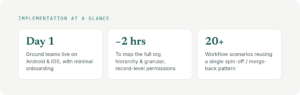
And the adoption showed up where it counts. In the first two weeks after go-live:

Some capabilities rarely make headlines but quietly determine implementation success. Version history, document repositories, PDF generation, document highlighting, digital signatures, audit trails, and mobile accessibility all contributed to reducing operational friction without requiring dedicated custom development.
Dashboards Don’t Display Data. They Drive Decisions.
We started by automating workflows. Ironically, the greatest value came from somewhere else—the dashboards.
As adoption grew, the workflows quietly generated structured data. Bottlenecks became visible, delayed approvals stood out, regional trends surfaced on their own—and leadership stopped chasing teams for status because the answers were already there. I’ve come to think about dashboards in three levels: what’s happening, why, and what to do next.
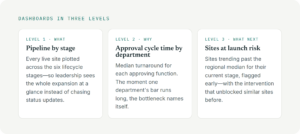
This is where dashboards stop being reporting tools and become decision systems.
Good workflows create data. Great dashboards create decisions.
AI Should Reduce Thinking Before Replacing Work
Most enterprise AI conversations begin with automation. I’d begin with reducing cognitive load. Today the platform’s AI removes repetitive work rather than people—extracting data from documents, pre-filling forms, cutting manual entry.
A concrete exampleShipped today: a trade license arrives as a scanned PDF. Rather than someone keying in the license number, issuing authority, and validity dates, the AI extracts them and pre-fills the compliance record—a reviewer just confirms. Minutes instead of transcription, with far fewer errors.
Next: prediction. If a site’s licensing stage stays open past the regional median, the model can flag a launch-date risk before it becomes an escalation—and suggest what cleared similar sites in the past.
That’s where enterprise AI earns its place—not another chatbot, but a decision-support layer woven into everyday operations.
From Workflow Automation to Decision Intelligence
Looking back, we didn’t build another workflow app. We built the foundation for a decision intelligence platform: workflows captured the data, dashboards turned it into visibility, and AI is beginning to turn visibility into recommendations—a progression I believe many enterprise products will follow.
Manual Operations → Digital Workflows → Decision Intelligence → Predictive Guidance
Technology makes digitization possible. Product thinking makes adoption possible. Decision intelligence makes it sustainable.
Automation wasn’t the goal. Adoption was.
The real signal is when users stop talking about the software and start talking about what they can now get done—faster, with more confidence and clearer visibility. That’s when you know you’ve built something worthwhile.
Have you faced the build-vs-reuse dilemma on your own products? I’d love to hear how you drew the line.